Resources
Introduction
I am already familiar with cloud-storage apps so I had an idea of what to expect not only from the document provided, but from my experience with using similar apps. I decided to go with a design sprint and try to get the solution, testing and this document as fast as possible. The design sprint followed this timeline:
Milestones (Mon → Fri): Receive task → Sketching → Building → Testing → Send task outcome
Parallel activities: Mapping / Deciding / Prototyping / Documenting (through the week), plus Research early in the week.
The Challenge
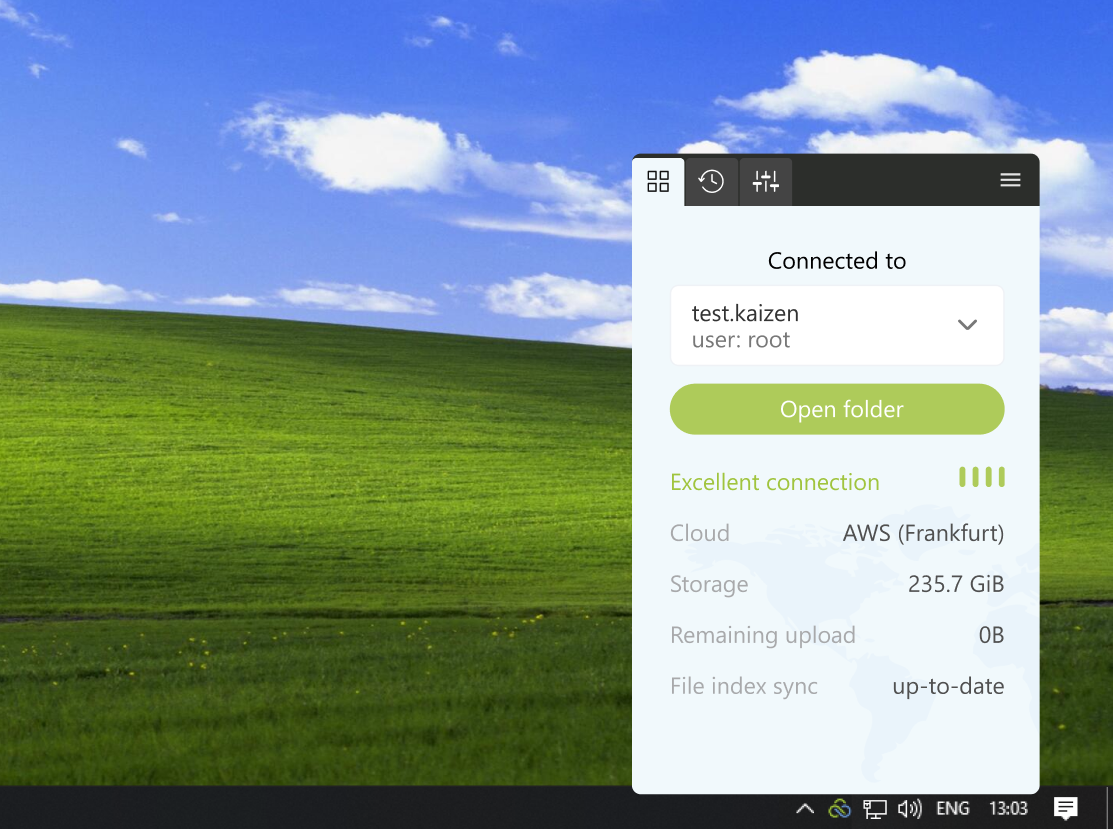
I approached the task by going through the onboarding process with a trial version. Syncing to my desktop looked like a well refined process. I went through switching between multiple domains where, as a user, I experienced some friction. I approached the task with the knowledge of how account switchers work on web-apps like Gmail where users can switch between multiple emails accounts.
The Problem
Two main issues stood out during my research:
- I could not quickly locate how to switch environments
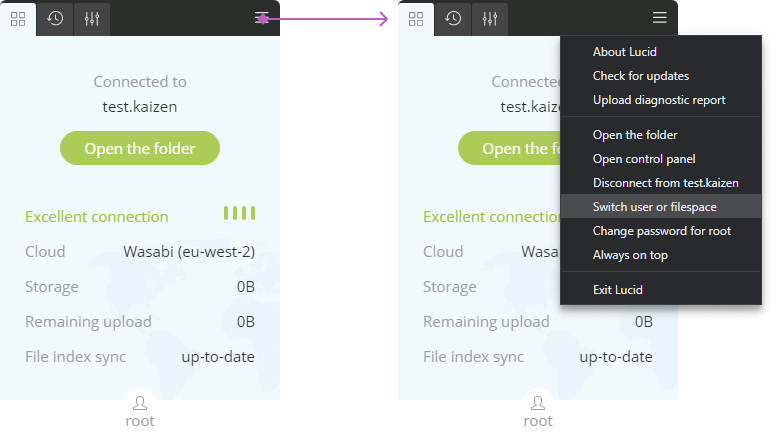
- When I eventually figured it out, the process of switching requires conscious effort
Even knowing where exactly the option is I am sure that the time it takes to select, switch and start working on a different environment takes at least a minute and sometimes more - which adds up over time and takes away valuable time from the customers/users.
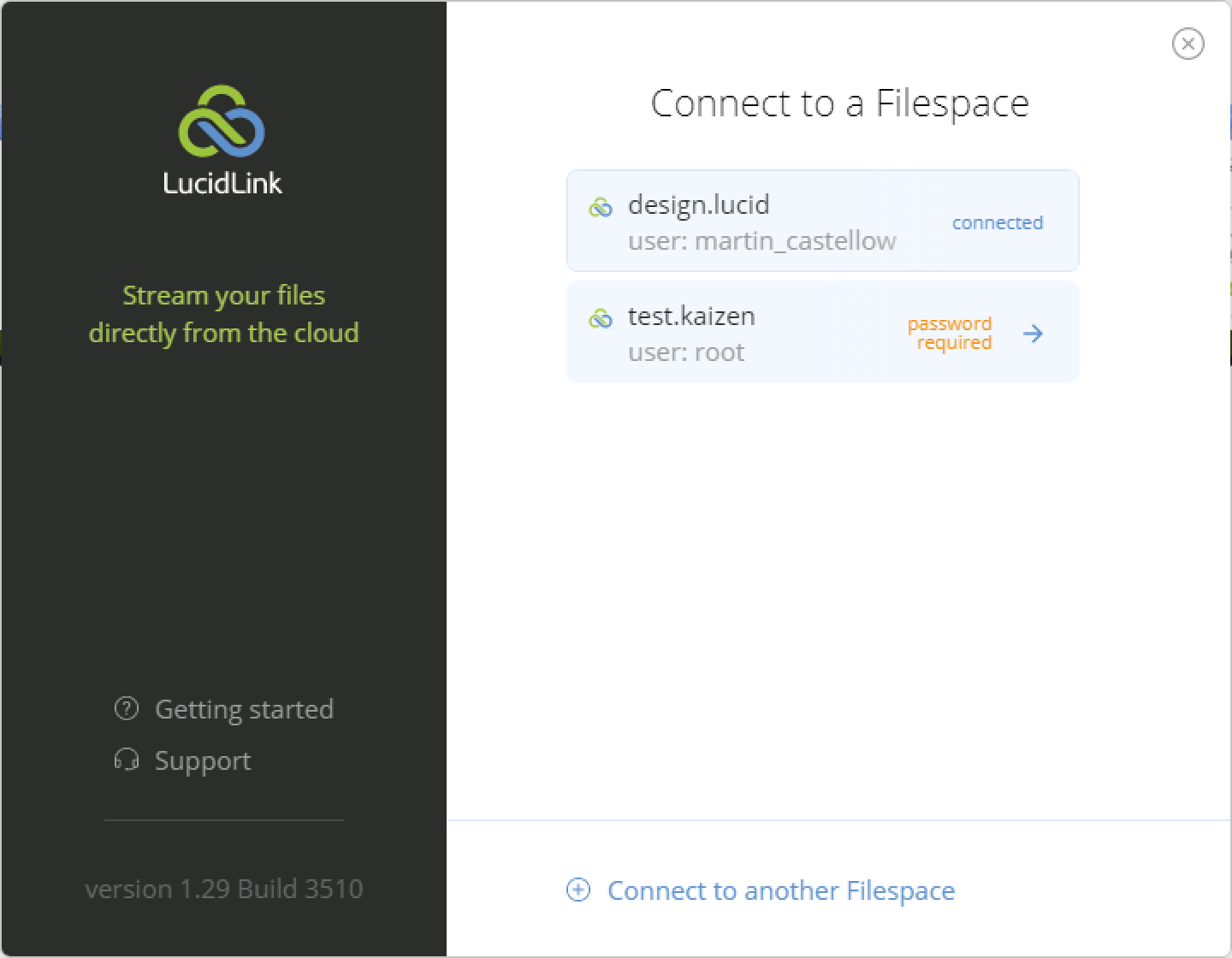
Using the app a little bit more revealed to me that the username displayed is not being used for anything meaningful (except showcasing which user is logged in) - thus not providing the user any significant value, yet it is directly connected to the domain and/or filespace as shown on the "Connect to a Filespace" screen.
The current path to switching relies on a deep menu entry ("Switch user or filespace") that users do not expect to find behind a generic options control:
The Hypothesis
Using common workspace-switching techniques should make this more intuitive. While Google certainly has its UX shortcomings, it has a user base large enough to influence flows with a learning curve.
The hypothesis thus became that it would be better to rely on an interface where the username is interactive and directly responsible for switching users and filespaces. If the filespace.domain and the user are combined, that will make them consistent with the "Connect to a filespace" screen.
Validation
To validate my hypothesis I created a prototype, set up a test using Maze.co and gave the link to 6 random people that match or are close to the described persona. Their goal in the test was to "Add a new filespace and then switch back to the initial one". Tracking their time and feedback would reveal whether or not I am on the right track.
Sadly I was not able to randomize which version the user sees first due to time and testing software constraints, but nevertheless the results were definitely impressive.
In real life, randomizing the user flow for more realistic A/B testing should be used for more definitive results.
The results
Design A (current implementation) time to complete task
- 81226405: 00:01:35
- 81232543: 00:01:51
- 81235930: 00:04:24
- 81239650: 00:02:51
- 81239806: 00:03:39
- 81277304: 00:01:03
- Average: 00:02:34
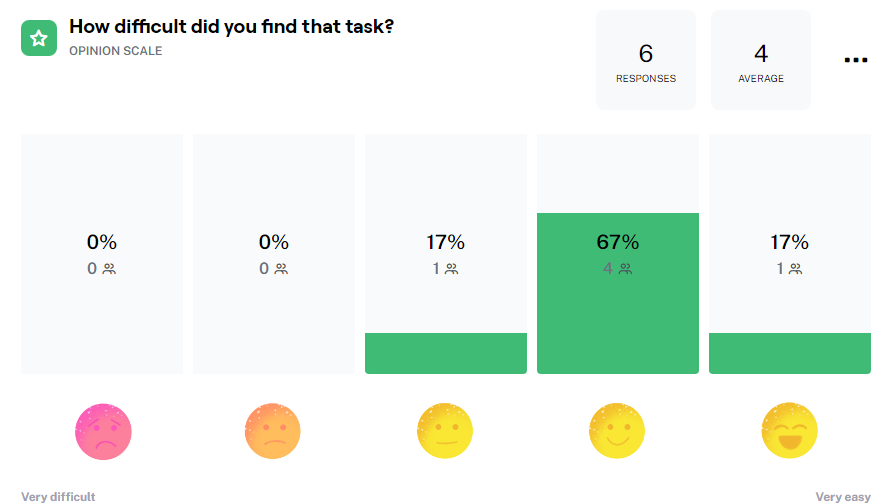
The average time it took those six participants to complete the task with the current design (Design A) was 2 minutes and 34 seconds. After completing the first task they were prompted to rate the difficulty from 1 to 5 (using smiley faces - 1 being very difficult and 5 being very easy) and the average was "4". From those six participants - four (67%) voted with "4", and the other two voted for "3" and "5".
Oddly enough - the person (Tester #81235930) who voted with "5" also took the longest time (00:04:24) to complete the task out of the group.
The six participants were also asked as an open question "What made [the task] easy or difficult?" to which I received this feedback:
- "It was kind of difficult to find the 'switch spaces' button because I expected it to be already visible and not 'hidden' in a submenu. After that it was easy" - Tester #81277304
- "The confusing part was the lack of actual access to on-screen buttons (referring to prototype fidelity), however, when I found out that the options button was clickable, I was easily able to locate the filespace switch option and work with it." - Tester #81239806
- "It took me a bit longer because I was attempting to create a FOLDER, oops. But afterwards I realized the point is to create an actual separate space and it was easy-peasy." - Tester #81239650
- "It's easy, because it doesn't have a complicated interface and it's easily accessible" - Tester #81235930
- "Switching filespaces required me to specifically 'disconnect' which seemed like something I wouldn't want to do since I would like to remain connected to both and just be able to easily switch between them. Later on, I figured out that the word 'disconnect' doesn't mean I'll get completely logged out or locked out and I was able to switch back and forth with ease." - Tester #81232543
- "Not a windows user, so I was disoriented at first. Also, didn't know what exactly filespace is and what's it's purpose." - Tester #81226405
What this feedback told me was that I was not alone in feeling confused about the position of the 'option' to switch users or filespaces. I did receive some comments regarding the fidelity of the prototype, but I am sure that with more time I would be able to iron out all of the kinks within the test and prototype itself.
Design B (proposed solution) time to complete task
- 81226405: 00:00:19
- 81232543: 00:00:22
- 81235930: 00:00:33
- 81239650: 00:00:32
- 81239806: 00:00:25
- 81277304: 00:00:27
- Average: 00:00:26
After seeing the results of the first participant - I was sure that my hypothesis had some merit to it and that I am the right track. The average time had come down to just a merely 26 seconds - eliminating 1 or 2 minutes on average. The difficulty of the task was rated as a solid "5" meaning 'very easy'.
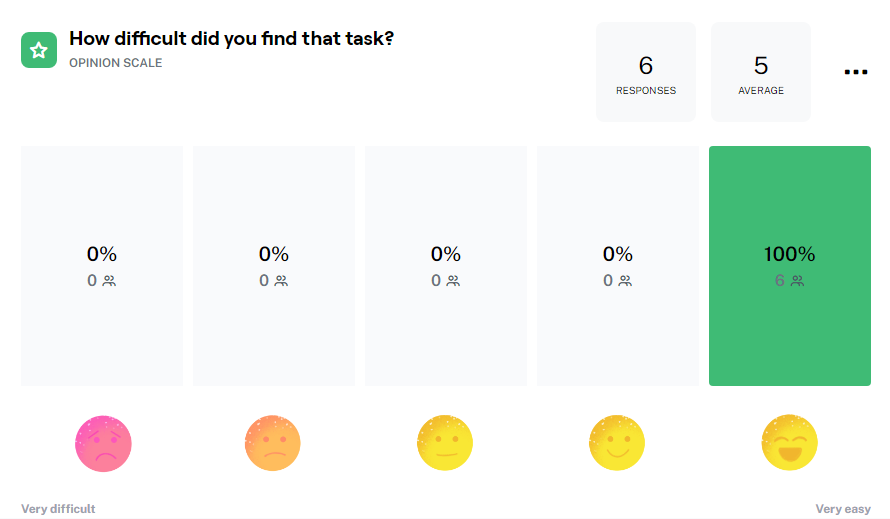
The quotes from the participants for Design B were also very interesting:
- "it was very intuitive to switch between spaces as the location of the switch button matched my expectations from other similar tools that I've used" - Tester #81277304
- "This option was easier than Design A, due to the fact that it took less clicks to view/change filespaces." - Tester #81239806
- "This was super clear. Switching spaces is literally a click away and the space name being a dropdown menu by itself guided my hand, I didn't even have to think about it." - Tester #81239650
- "This option is even more convenient" - Tester #81235930
- "Extremely intuitive due to the highly visible dropdown menu for selecting/switching between spaces. Compared to the almost hidden button on Design A, this one is brilliant!" - Tester #81232543
- "The dropdown was way easier to spot than the hamburger menu" - Tester #81226405
All of them agreed that this type of control is way easier to use, especially when brought into the foreground.
The (proposed) Solution
Given the information I had at the time, I went with the design on the screenshot below. It is meant to tackle the UX problems outlined previously while using a lower degree of refinement to achieve a high effect for a low cost and low time-to-market. Ideally the dropdown would be based on company's design system specs to ensure that it doesn't stick out and looks consistent with the application.
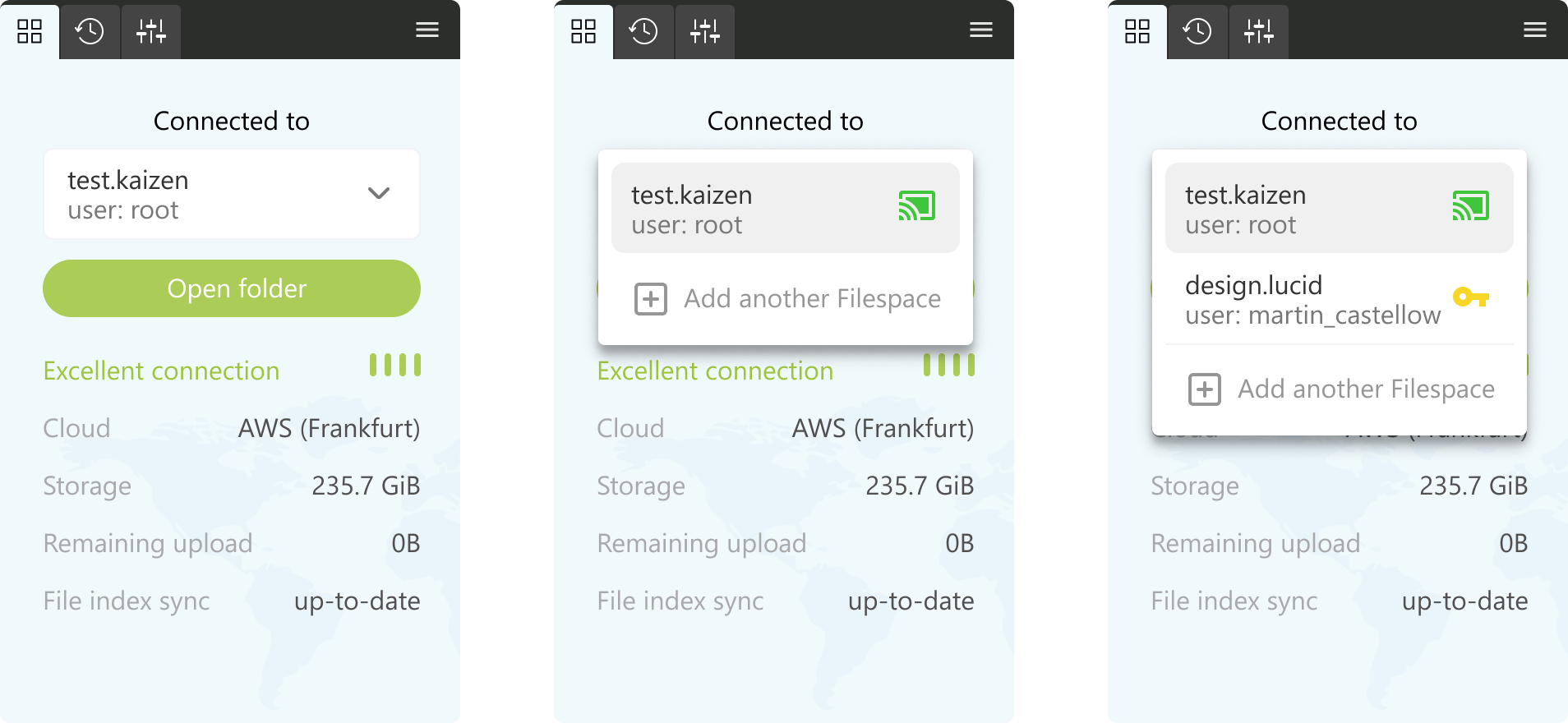
As one of the testers said: "This was super clear. Switching spaces is literally a click away and the space name being a dropdown menu by itself guided my hand, I didn't even have to think about it." — Tester #81239650
Of course I do not think that this is the perfect solution as I'm sure that if I spend more time within the business I would know more about the reasoning and functional restrictions behind some of the features/solutions that are currently in place.
End results
Task completion time
- 81226405: Design A 00:01:35, misclicks 6 → Design B 00:00:19, misclicks 0 — saved 00:01:16
- 81232543: Design A 00:01:51, misclicks 23 → Design B 00:00:22, misclicks 0 — saved 00:01:29
- 81235930: Design A 00:04:24, misclicks 60 → Design B 00:00:33, misclicks 0 — saved 00:03:51
- 81239650: Design A 00:02:51, misclicks 22 → Design B 00:00:32, misclicks 0 — saved 00:02:19
- 81239806: Design A 00:03:39, misclicks 51 → Design B 00:00:25, misclicks 0 — saved 00:03:15
- 81277304: Design A 00:01:03, misclicks 15 → Design B 00:00:27, misclicks 3 — saved 00:00:36
- Averages: Design A 00:02:34 → Design B 00:00:26 — saved 00:02:08 on average
Task rating
- 81226405: Design A 4 → Design B 5
- 81232543: Design A 4 → Design B 5
- 81235930: Design A 5 → Design B 5
- 81239650: Design A 4 → Design B 5
- 81239806: Design A 4 → Design B 5
- 81277304: Design A 3 → Design B 5
- Averages: Design A 4 → Design B 5